.png)

Microsoft Copilot Features That Make Life Easier

If you have Microsoft 365, there is a good chance you already have access to Copilot. Most of its most useful features require no technical knowledge and some need nothing more than a single click.
Here is some Microsoft Copilot features that make life easier with a practical overview of what it can do across your working day.
Use Copilot across Microsoft 365 apps:
App | Feature | What it does |
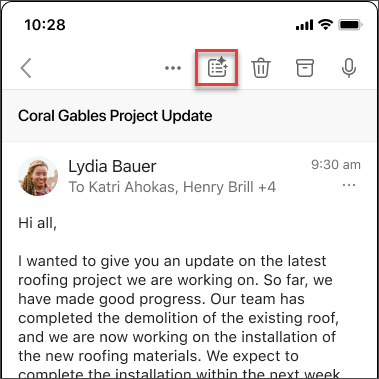
Outlook | Thread summary | Summarises long email chains at the top of the thread so you can get up to speed instantly. |
Outlook | Email drafting | Writes a first draft based on a short instruction, including tone and length. |
Outlook | Translation | Translates incoming messages and composes replies in other languages. |
Teams | Meeting recap | Produces a summary of key topics and action items after a meeting. |
Teams | Late join catch-up | Summarises what you missed if you join a meeting already in progress. |
Teams | Meeting notes | Generates notes and action items so you can focus on the conversation. |
Word | Document summary | Pulls out the key points from a lengthy document. |
Word | Content drafting | Turns a brief outline into a first draft for you to refine. |
Word | Rewrite | Polishes rough notes and lets you adjust tone and style. |
Copilot Chat | Weekly summary | Pulls together emails, chats, and files into a project overview for the week. |
The features worth starting with
If you are new to Copilot, these are the ones that deliver the most immediate value without any learning curve:
Outlook thread summary - open a long email chain and click Summarise. No prompt needed.
Teams meeting recap - ask Copilot to recap after a call and get notes and actions in seconds.
Email drafting - give Copilot a one-line brief and let it produce a first draft for you to review.
Document summary - paste in or open a long file and ask for the key points as a list.
Who benefits most?
Copilot tends to deliver the biggest impact in sectors where communication and documents dominate the working day. If you work in accountancy, architecture, property, or recruitment and your team is regularly buried in email threads, back-to-back meetings, or lengthy client files, the time savings are noticeable from day one.
Is Copilot included in your licence?
Copilot availability depends on which Microsoft 365 plan you are on. If you are unsure whether it is included or how to switch it on for your team, get in touch with us and we will check your licence and get you set up.


Comments